A Faster, Easier Way to Pay Your Fare
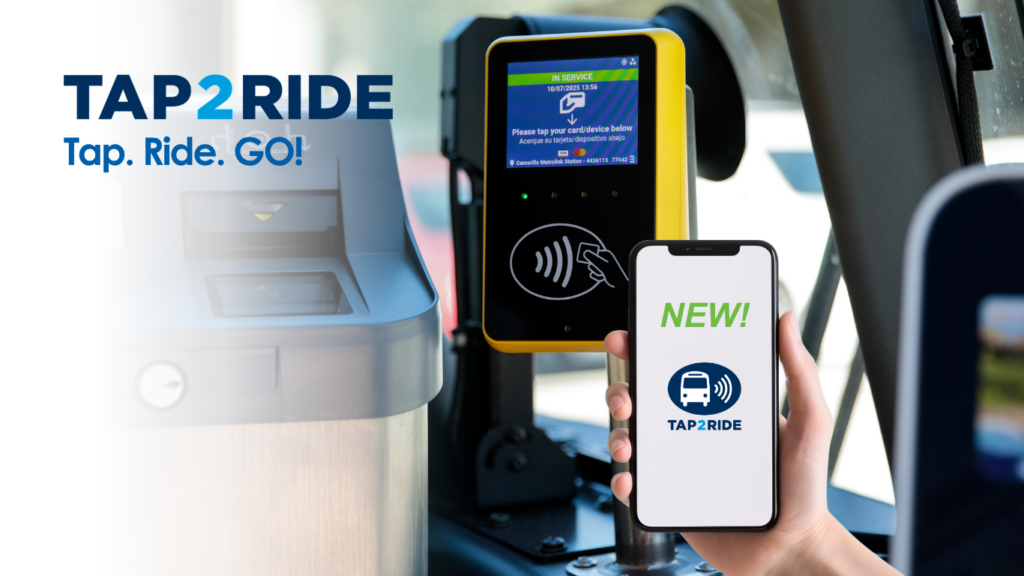
Pay your fare by simply tapping your contactless credit or debit card or mobile wallet when you board a GCTD bus. No cash. No app. No ticket.
Just Tap. Ride. GO! Tap2Ride is now available on all GCTD fixed-route buses.
How Tap2Ride Works
Paying with Tap2Ride is easy.
Step 1: Board the Bus
Look for the yellow payment reader when you board.
Step 2: Tap Your Payment
Tap your card or device where the contactless symbol is shown on the yellow Tap2Ride reader.
Accepted payment methods include:
- Visa®
- Mastercard®
- Discover®
- Apple Pay®
- Google Pay®
- Samsung Pay®
Note: Amex is not yet eligible.
Step 3: Wait for the Green "GO!"
When you see the green GO! screen, your payment has been accepted.
Take your seat and enjoy the ride.
Things to Know Before You Ride
One Card = One Rider
Each contactless payment card or mobile wallet can only pay for one passenger.
If you're traveling with family or friends, each rider must use their own payment method or another accepted fare option.
Reduced Fare
* Important for Reduced Fare: You must register your card to get the discount.
Fares
Full Fare: $2.00 per ride
Reduced Fares: $1.00 per ride
Seniors 65+, Disabled, Medicare, VA Card
Regional Fare
Full Fare $4.00
Reduced* $2.00
* Important for Reduced Fares: You must register your card to get the discount.
Need Help?
Questions about Tap2Ride?
Contact GCTD Customer Service:
Phone: (805) 487-4222
Email: CustomerService@gctd.org
Monday–Friday: 8:00 a.m.–5:00 p.m.
Other Ways to Pay
GCTD continues to accept all current fare payment options, including:
- VCbuspass Card
- Umo Mobility App
- Token Transit Mobile Tickets
- Paper Passes
- Exact Cash
Tap2Ride is simply another convenient way to pay your fare.
Tap2Ride - Frequently Asked Questions
Gold Coast Transit District (GCTD) offers credit and debit card fare payment technology on its fixed-route buses. We have compiled this list of Frequently Asked Questions (FAQs) to share information about this payment framework.
PAYMENT METHODS & SETUP
ACCEPTED PAYMENT METHODS
Tap2Ride (Contactless)
- Bank Cards: Contactless Visa & Mastercard.
- Mobile Wallets: Apple Pay, Google Pay, Samsung Pay.
Traditional Methods
Yes, other methods are still accepted! You can still use:
- Cash (Exact Change)
- Paper Passes
- Token Transit Mobile Tickets
- VCbuspass
- Umo Mobility App
- Valid Free Fare Programs
HOW TO PAY ON THE BUS
- Spot the Reader: Look for the yellow device at the front of the bus.
- Tap Your Card/Phone: Hold your device or card over the Contactless Symbol below the screen.
- Wait for Green: Once you see the green “GO!” screen, your fare is paid.
Tip: Always tap at the start of your trip to ensure you’re charged the correct fare.
TROUBLESHOOTING & OPTIONS
Why isn’t my card working?
- New Card: It may need activation. If it fails, contact your bank.
- Declined: Your account may not have enough funds.
- Damaged/Expired: Check the expiration date or chip condition.
- Unsupported: Only Visa & Mastercard are accepted currently (No Amex/Discover yet).
Don’t have a contactless card?
- Use Your Phone: Add existing cards to Apple/Google Wallet.
- Apps: Order a free contactless debit card via Cash App, PayPal, or Venmo.
- Find Low-Cost Banking Options →
We partner with Bank On to help you find affordable accounts.
Is it Secure?
Yes. Tap-to-pay transactions use the same secure networks as inserting a chip card.
- Built on secure EMV® Chip technology to reduce fraud.
- Generates a dynamic, one-time code for every tap (just like inserting a card).
- Protects your payment info and authorizes the transaction instantly.
USING TAP2RIDE
RULES & COSTS
Do I need to tap on every bus?
YES. To use your free transfer, you must tap on the next bus.
- First Tap: You are charged the fare.
- Next Tap (within 2 hours): The system recognizes your card and gives you a FREE transfer automatically.
Are there extra fees?
No. There are absolutely no additional fees for using Tap2Ride.
You pay the exact same standard fare as cash users. Plus, you get access to Monthly Fare Capping discounts automatically when you use the same card.
FARES & DISCOUNTS
Fare Capping (Pay-As-You-Go)
What is it?
Fare capping is a discount that ensures you never pay more than a 31-Day Pass, no matter how many times you ride. You don’t need to pay $50 or $130 upfront—just pay per ride until you hit the limit!
How it works:
- Pay for each trip as you go.
- Once you reach the Cap Limit (see below) within 31 days, the rest of your rides are FREE.
- Crucial Rule: You MUST use the exact same card/device for every tap to track your progress.
Monthly Cap Limits
ZONE 1 CAP (Ventura County)
$50.00
Max Charge per 31 Days
Ride free after spending $50.
(Period starts on your first tap)
ZONE 2 CAP (Regional)
$130.00
Max Charge per 31 Days
Ride free after spending $130.
(Period starts on your first tap)
Reduced & Free Fares
Seniors (65+) & Medicare
You can receive reduced fares on Tap2Ride, but you must register your card first.
Students & Youth:
Looking for College Ride or Youth Ride Free programs?
SECURITY, PRIVACY & TRANSACTIONS
Security & Privacy
Is Tap2Ride Secure?
YES. Your payments are safe.
- Bank-Grade Security: Transactions use the exact same secure networks as any Visa or Mastercard payment.
- Fraud Protection: We use EMV® Chip technology, which generates a unique, one-time code for every tap to prevent counterfeit fraud.
Is my data private?
Absolutely. GCTD does not store, sell, or share your personal data. All payment information is handled according to strict Payment Card Industry (PCI) Data Security Standards.
Does my bank see my travel history?
No. Just like buying a coffee, your card issuer only sees the amount of the transaction, not your specific travel details or route history.
TRANSFERS & MULTI-RIDER USE
Important Rules
Can I pay for friends/family?
NO.
Each rider must have their own card.
1 Person = 1 Card.
You cannot tap the same card multiple times for different people.
The “Same Card” Rule
YES.
You must use the exact same card or device for every tap.
The system “remembers” your card to automatically grant your free transfer. If you switch cards, you will be charged again.
Transfers (Valid for 2 Hours)
- Transferring to another GCTD Bus?
- Just tap the same card on the second bus. The reader will recognize your previous trip and give you the ride for FREE automatically.
- Transferring to a different regional bus operator?
- Ask the driver for a Paper Transfer when you board your first bus. The Tap2Ride system cannot digitally transfer you to other agencies (like VCTC) yet.
Can I pay for friends/family?
NO.
Each rider must have their own card.
1 Person = 1 Card.
You cannot tap the same card multiple times for different people.
Note: If you have both a physical card and a digital wallet version of that same card, they count as separate payment methods. This means you can use them for different riders - but each person must tap their own card or device.
How do charges appear on my bank account?
When will I see a charge after I tap my card?
Fares are grouped and charged in one lump sum at the end of each day. Charges will appear as Gold Coast Transit District.
Depending on your bank’s processing time, you’ll typically see the final charge appear within 1 to 2 business days after you travel.
To view your recent rides on Gold Coast Transit District and see what you were charged, visit our Customer Transactions Inquiry Page or check your bank card statement.
ISSUES, DISPUTES & EXPANSION
Step 1: Check Your History
Suspect an incorrect charge? View your full travel history and payments online first.
Step 2: Dispute a Charge
If you still see an error after checking your history, our support team can help fix it.
Customer Service: 805-487-4222 or via email: CustomerService@gctd.org here. Be prepared to provide the payment reference number from your bank statement so that our team can investigate further.
Why isn't my card working?
- New Card: It may need activation. If it fails, contact your bank.
- Declined: Your account may not have enough funds.
- Damaged/Expired: Check the expiration date or chip condition.
- Unsupported: Only Visa & Mastercard are accepted currently (No Amex/Discover yet).
- Use Your Phone: Add existing cards to Apple/Google Wallet.
- Apps: Order a free contactless debit card via Cash App, PayPal, or Venmo.
What if I don't have a contactless card?
Cards that are contactless-enabled have the following symbol:
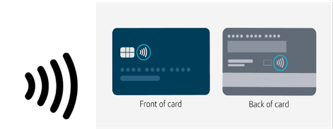
You can add an existing credit or debit card to your smart device via Apple or Google Wallet and use your phone to Tap2Ride.
You can open a bank or checking account that includes a contactless debit card. We partnered with Bank On to find low cost banking options, click here for a list of banks near you. You can order a contactless-enabled debit card through the Cash App, PayPal App and/or the Venmo App using your smartphone – no need to have a bank account
You can also click on the green "Translate" tab located at the top right corner of this page to choose your language of choice and the page will be translated automatically.